If you’ve ever felt your Android phone’s audio is too low—whether on speaker, headphones, or during calls—a Volume Booster app for Android can help increase loudness beyond the default system limits. Many users search for a Volume Booster download, Volume Booster APK, or the best booster app to amplify sound for music, videos, games, and voice.
In this article, you’ll learn what a volume booster is, how it works, key features to look for, how to download/install safely (including APK), and important safety tips to protect your ears and your device.
What Is a Volume Booster App for Android?
A Volume Booster is an Android application designed to increase your phone’s audio output above normal levels. It typically boosts:
- Media volume (YouTube, music apps, video players)
- Speaker volume
- Headphone volume
- Bluetooth audio volume (in some cases)
- Call volume (some apps claim this, but results vary by device)
Many apps advertise boosts like “200%” or even “300x”. In practice, the “300x” claim is usually a marketing way of saying the app can apply aggressive amplification. Actual results depend heavily on:
- Your phone’s hardware (speaker & DAC quality)
- Android version and manufacturer limitations
- Whether audio is played through speaker vs. headphones
- The app’s boosting method (EQ, gain, limiter, etc.)
How Does a Volume Booster Work?
Volume booster apps generally increase loudness using one or more of these techniques:
1) Audio Gain / Amplification
The app amplifies the audio signal (adds “gain”). This can increase perceived loudness, but pushing too far can cause distortion.
2) Equalizer (EQ) Enhancement
Some boosters raise certain frequencies (like mids/highs) to make sound feel louder and clearer.
3) Loudness/Virtualizer Effects
Certain apps use Android audio effects such as virtualizers or loudness enhancers to create a stronger sound perception.
4) Limiter/Compressor (Better Apps)
Higher-quality booster apps include a limiter or compressor to reduce harsh clipping while boosting overall volume.
Key Features of a Good Volume Booster App
When choosing the best Volume Booster for Android, look for these features:
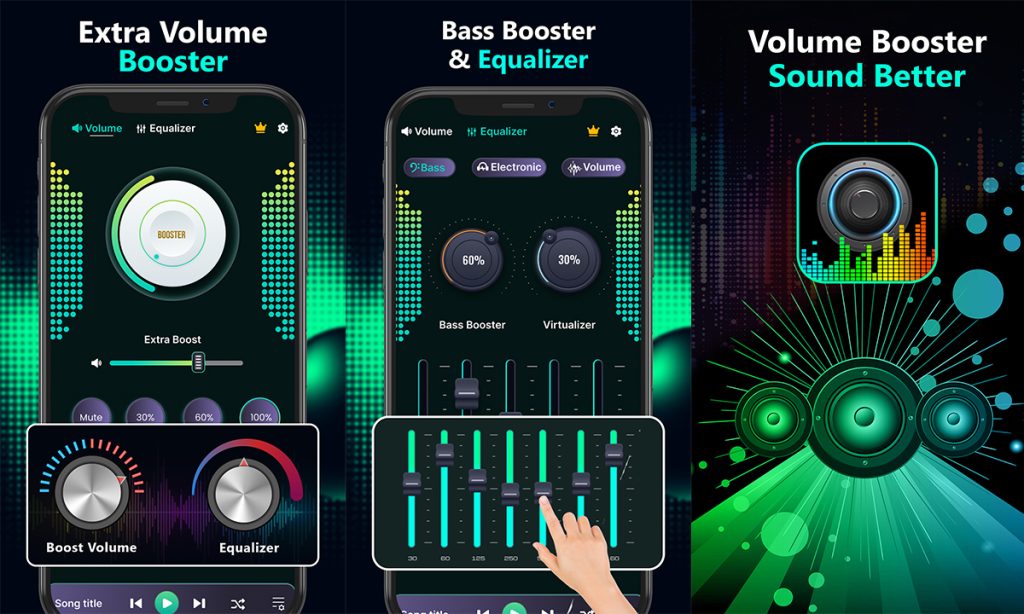
✅ One-Tap Boost Mode
A simple boost button to quickly amplify volume.
✅ Custom Level Control
A slider to adjust boost intensity (for example: 10% to 100%+), so you can avoid distortion.
✅ Equalizer Presets
Presets like Bass Boost, Vocal, Music, Movie, Gaming, etc.
✅ Speaker and Headphone Support
Separate boosting profiles for speaker vs. wired headphones vs. Bluetooth.
✅ Safety Controls
- Clip protection / limiter
- Warnings for high volume
- Auto reset or safe-mode option
✅ Lightweight & Fast
Should not drain battery heavily or run too many background services.
Volume Booster Download: How to Install (Safest Method)
Download from Google Play Store (Recommended)
This is the safest way because:
- Apps are scanned for malware
- Updates are easier
- Permissions are easier to review
Steps:
- Open Google Play Store
- Search: Volume Booster
- Check rating, reviews, and downloads
- Install and test with low boost first
Download Link
How to Use a Volume Booster App (Best Settings)
Here’s a safe and effective way to use a Volume Booster:
- Start audio at normal volume.
- Open the booster app.
- Increase boost gradually:
- Start at 10–20%
- Test for distortion
- If sound becomes crackly:
- Reduce boost
- Lower bass frequencies in EQ
- For headphones:
- Use lower boost than speaker
- Avoid long listening at high levels
Tip: Often the best loudness comes from moderate boost + EQ clarity, not maximum gain.
Best Use Cases for a Volume Booster
A volume booster app is useful for:
- Low-volume movies or videos
- Quiet voice recordings
- Games with low audio output
- Outdoor listening where background noise is high
- Some Bluetooth speakers with low output (results vary)